Sunday, September 6, 2009

Saved by some good free software

For simple utilities, I try to find free software.  I look for stuff that is free free, not free to try, or free but there is a PRO version that you can buy.  The good free stuff doesn't have a financial agenda--often distributed under the GPL GNU public licensing, so they don't pack a bunch of glitz and bloat.  Small programs that just do what they are supposed to do are gems.  I like XNView for image work (where Paint just isn't good enough), CutePDF for generating PDF files, PDFTK Builder for assembling and disassembling PDF files, Crimson Editor for text editing, Launchy which I use for a super fast folder finder at work, Gimp for a high-end hard to use image manipulations (I used this for collages, NOT user friendly but very powerful). 

Recently I ran into a problem where I had to download a upgrade file for work that was about 150MB, then had to download another set of update files that totaled an additional 600MB.  Even with a fast connection, this is asking a lot.  I downloaded the 150MB file twice, and each time had an error at the end of the download, a big time consuming failure.  Frustrated, I tried to find a good free download manager and found Free Download Manager.  Certainly a good download manager, maybe not the best I've used, but more than up to the task.  One of the things you lose if you don't use a download manager is the ability to tolerate a network interruption, and for long downloads this is a real risk.  Also, a download manager like this will let you pause (or prioritize, or schedule) the download so that you can do other things with your internet connection and not suffer excruciatingly slow page uploads.

Free Download Manager


Another little program I found that was worth the download is Folder Size.  This does nothing but add the size of the folders to Windows Explorer.   Doesn't seem like a big deal, until that's exactly what you need!  I was running out of disk space and couldn't figure out why--this program helped me find the offending culprits.  The offending culprits were indeed junk, and I safely deleted the lot of them, recovering LOADS of space.

Labels:

Thursday, September 20, 2007

Warning, IT Post

I've known for quite a while that you can create PDF files by getting a free "printer driver" that makes a PDF file instead of a piece of paper. I've been using Print2PDF from P602, but I think that cost a couple of dollars. There are good free ones, and I hear cutePDF is good, and would probably recommend it even though I've never used it.

For less time, I've been using a program to combine multiple PDF files into one, and to split and reorder PDF files. I've done it "the hard way". I installed MinSYS, a minimal linux system running in windows, and pdftk to run in that environment. Wow. Not for the feint of heart, but it worked for me. And I was proud that I could do it.

Well, now there is a program for doing this that runs in windows. Angus Johnson has posted pdftk builder. It has the download that runs in Windows and does exactly what my much more complicated implementation of pdftk did, only with a much easier user interface. Trivial? Maybe not, but useful if this is the sort of thing you like to do.

Labels:

Friday, May 25, 2007

Lonely and Dejected Office Assistant

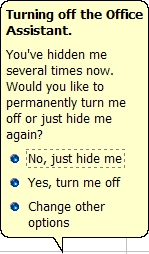
Even though I've been using Microsoft Office 2000 for years, an interesting set of events seems to have happened today. I guess I must have opened a document, and after the office assistant (I use Einstein) walked in, I closed him down. He's not really very helpful anyway--hasn't been for years. Well, I must have repeated this a few times with various docs, spreadsheets, and/or presentations--I didn't really keep track. Apparently, the assistant will only take it so long. I got the following message:


Can you feel the pain in this plea? Do you want to get rid of me forever, or do you just want me to go away, hoping that maybe you'll need me next time? I felt like if I pushed the button to permanently turn the assistant off that another balloon would pop up and the assistant would be on its knees and sobbing "Please take me back! I can be useful! I can show you things! PLEASE!!!" Or maybe the assistant would get furious. "You think you can handle these spreadsheets without me? What are you going to do when you can't figure out how to combine data from different worksheets onto a single chart that is automatically updated with live data? You want to go it alone? YOU WANT TO GO IT ALONE? YOU CAN'T HANDLE IT ALONE!!! YOU NEED ME!!!

I turned it off. I'm heartless.

Labels:

Monday, March 5, 2007

Meanwhile Back On The Couch

Had an absolutely SPLENDID evening enjoying the KC Players "Meanwhile Back On The Couch".

Lots of pictures of varying quality. No flash photography was used, so my options were limited. The slideshow is pretty long, but has maybe half of the pictures I took. I just kept clicking, because I couldn't tell what if any were going to come out.


The slideshow was created using Picasa2 and WebAlbums. It's as easy as using Picasa to select the pictures [edit, resize, etc] upload to WebAlbum, then running the slideshow feature and capturing the URL. Stick the URL in an iframe and you're done. I use


(iframe src="[Full URL, no spaces]" frameborder="0" width="550" height="400")
(/iframe)


Substitute < for ( and > for ).
[Anyone know the html for entering code? tt and blockquote didn't do it.]

Labels: , ,

Sunday, March 4, 2007

Photo collage

Hey Dad, I need a collage for tomorrow. No problem... Check it out:


This was done with the free image processing software "GIMP". This was the first time I'd used this software, in fact I downloaded it just for this project. Very capable software, but not for the fainthearted. I'd tell you where to get it (free) but if you get frustrated trying to figure out where to find it on the web, you probably won't hold up to the learning curve.

It might have been easier if I actually looked at the 39MB help file...

Labels: ,

Wednesday, January 10, 2007

Meebo Rocks!

At least it does so far. Thanks to PCWorld magazine for identifying Meebo as one of the most useful websites. Meebo lets you log onto all of your IM logins at the same time, and runs it all out of a pretty-well-done web site. The buddy list and message windows will float if you want them to, or they can stay put inside a single browser. Gotta see it to appreciate it. I have AOL, MSN, and Google Talk logins (now also Meebo!) and Meebo will start them all with a single login and better yet I DON'T HAVE TO RUN AIM OR MSN MESSENGER!! Meebo handles all of that! All I need is my login info. I very well may uninstall AIM--wouldn't that be nice!

Check me out if I'm online in the lower right side of this screen. Meebo will tell you if I'm online and if so, you can chat immediately. (Don't forget to identify yourself!)

But whether or not you check me out, check out Meebo
http://wwwl.meebo.com/index-en.html

Labels:

DirLot and the full hard drive

I don't know where the "Label" shows up, but this post is labeled "IT"

Have you ever tried to clean the clutter out of a nearly-filled-up hard drive, only to find out that after deleting a bunch of stuff, the hard drive is still nearly full?! Where are the big files?!

Sure, you can wipe out the old internet files and cookies, but did it help? (Did you remember to wipe out all the files from each account on the computer?) I did. Didn't really help. So I looked for a utility, preferably one that worked well, was unobtrusive, and FREE. Found a few things that looked promising, but were either not really free, or just didn't do what I wanted. Then I found a tiny little program that looked good, but I had to "register" first. The registration process bombed (fortunately) so I searched the author and found his site, where you can download the software free, unrestricted, without registration! So I did, it's called DirLot

http://soft.km.ua/soft/dirlot/index.en.html

The zipped download is about 25kB (!) and unzips into a tiny directory structure totaling about 52kB. That's KB not MB!!! It doesn't install anything, it is just an html application (no, I don't really know what that means). When you run it, it displays in color, in your web browser, the relative size of each of the folders and files in a directory. It is very intuitive and easy to use.

My (relatively old) laptop has 18GB HD, and had gotten down to < 1 GB free. I used this program to find large file collections that could safely be deleted, and got down to 9 GB free!!! New Life!! One surprising culprit was the large amounts of Windows Update Uninstall files.

Hope this is useful for you!

Labels: